


Introduction to Call Center Simulation Software
Every CX leader faces the same question when evaluating simulation software: how much work will this actually take? For most of the industry's history, the answer was a lot. Instructional designers spent weeks building a single scenario. Subject matter experts gave hours of input. IT teams configured integrations. By the time the simulation was live, the process it modeled had already changed.
What Changed in Call Center Simulation Software in 2026
The most significant shift in simulation software is not better AI models or richer analytics. It is who builds the simulations. In LLM-native platforms, AI agents read your SOPs, analyze your call recordings, and construct complete simulation environments autonomously. You provide the source materials. The AI agents handle the rest. In a recent competitive bakeoff, this approach proved to be 30x faster than the next leading option. Not 30% faster. Thirty times.
That speed difference is structural, not incremental. Legacy platforms require human effort at every step: mapping decision trees, scripting branching logic, configuring system replicas, writing coaching prompts. AI-agent-built platforms require human effort only at the end, reviewing and testing the finished simulation. The entire creation process, from raw materials to practicing agents, collapses from months into hours.
The question is no longer 'how long will it take to build simulations?' It is 'how long until my agents are practicing in them?' With AI-agent-built simulations, the answer is hours, not months.
Core Capabilities of Call Center Simulation Software
Not every platform that claims AI-powered simulation delivers the same depth. These are the capabilities that separate tools built for 2026 from those retrofitting features onto legacy architecture.
- Autonomous simulation building: AI agents ingest your documents, recordings, and workflows, then construct interactive scenarios without instructional design work. The best platforms handle hour-long conversations spanning 20+ systems.
- Interactive system replicas: Agents should practice in functioning copies of your CRM, ticketing, and internal tools. Static screenshots do not build the muscle memory that live calls require.
- Closed-loop QA and coaching: Quality scores should automatically trigger targeted practice. When an agent struggles with a specific scenario, the platform assigns the relevant simulation before the next shift.
- Real-time guidance: During live calls, agents need context-aware suggestions based on the full conversation, not keyword triggers that fire at the wrong moment and erode trust.
- 100% conversation analysis: Manual QA reviews roughly 1% of calls. You need a platform that scores every conversation and surfaces the patterns hiding in the other 99%.
AI-Powered Features Transforming Call Center Training
Most vendors describe AI as a feature they added. In LLM-native platforms, AI agents are the foundation. They read your SOPs. They watch your training videos. They study your best calls. Then they build complete simulation environments from scratch. They replicate your actual systems as interactive digital twins. They create branching scenarios that mirror real customer interactions. They write the coaching feedback.
Here is what this means in practice: you drop in your materials, and AI agents build simulations for conversations that span an hour or more, across 20 or more different applications. No instructional designer mapping decision trees. No developer coding custom integrations. No weeks of iteration before agents can practice.
Your agents handle these complex, multi-system conversations every day. They navigate your CRM, your ticketing system, your knowledge base, and a dozen other tools in a single call. Legacy simulation platforms cannot replicate that complexity without massive manual effort. AI-agent-built platforms replicate it automatically because the agents understand your systems and workflows the same way your best people do.
In a recent competitive bakeoff, AI-agent-built simulations were created 30x faster than the next closest platform. The difference is not in speed alone. It is in what becomes possible: realistic, multi-system practice environments built from your actual materials, ready for agents in hours.
Key Integration Requirements for Simulation Platforms
Conventional wisdom says simulation platforms need deep integrations with your CRM, telephony, and helpdesk before they deliver value. That used to be true. It created six-month implementation timelines and IT bottlenecks that delayed pilots indefinitely.
LLM-native platforms take a different approach. They start by ingesting the materials you already have. Drag and drop your PDFs, call recordings, training manuals, and knowledge base exports. AI agents learn your business from these materials and build simulations immediately. No API keys required. No IT project. No waiting.
Must-have integrations: CRM (Salesforce, Dynamics), Telephony (Genesys, Twilio), and Helpdesk (Zendesk, Freshdesk). Nice-to-have: HRIS, BI tools, and LMS connectors. But none of these should block your pilot.
As you scale, deeper integrations enrich the platform with live data. But the pilot starts in hours, not months. This matters because the biggest risk in evaluating simulation software is not choosing the wrong vendor. It is spending so long implementing the right one that you lose organizational momentum.
Defining Your Training Outcomes and KPIs
Technology evaluations fail when they start with features instead of outcomes. Before reviewing any platform, align your team on what success looks like.
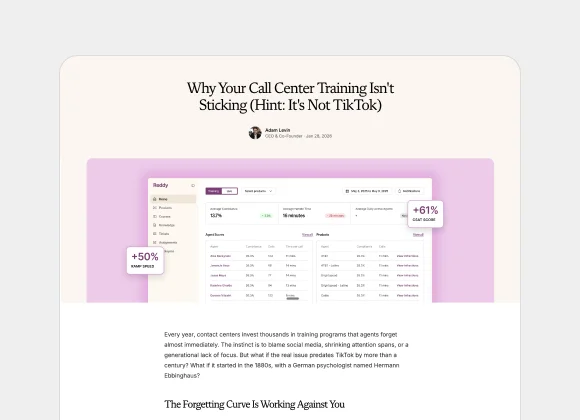
- Ramp time: How many days from hire to independently handling calls? Enterprise teams using AI-built simulations have cut this by 50% or more, in part because most traditional training doesn't stick the way leaders assume.
- QA coverage: What percentage of conversations do you currently review? Moving from 1% to 100% reveals patterns that sampling never captures.
- CSAT improvement: What would a 10 to 15% increase in customer satisfaction mean for retention and revenue?
- Content creation speed: How long does it take to build a new simulation today? AI agents should reduce this from weeks to hours — especially for the hard-to-train skills that drive the biggest retention gains.
Step-by-Step Selection Checklist for Call Center Simulation Software
Use this checklist to structure your evaluation. It is ordered by what matters most, not by what vendors most want to show you.
- Clarify the problem: Are you solving onboarding speed, ongoing coaching gaps, QA coverage, or all three? The right platform connects these into a single loop.
- Evaluate setup effort honestly: Ask each vendor exactly how many hours your team invests before agents can practice. If the answer is more than a day, ask why.
- Test on your own scenarios: Provide your actual SOPs and call recordings. Watch how the platform handles your complexity, not a curated demo.
- Measure the pilot, not the pitch: Run simulations with a mixed group of new hires and tenured agents. Track ramp speed, confidence scores, and QA results.
- Ask about the closed loop: Does the platform automatically connect QA findings to coaching assignments? Manual handoffs between quality and coaching create gaps where improvement stalls.
Evaluating Vendor Solutions Through Pilot Testing
A demo shows you what the vendor wants you to see. A pilot shows you what your agents will actually experience. Start with your highest-volume, most complex call types. These are the scenarios where simulation delivers the fastest ROI and where weak platforms fall apart.
During the pilot, track these benchmarks against your current baseline:
- Days from hire to first independent call
- QA score improvement in the pilot group versus control
- Agent confidence and readiness self-assessments
- Time the vendor required to build simulations from your materials
- CSAT lift in calls handled by agents who practiced in simulations
Real customer benchmarks: Morgan & Morgan reduced ramp time by 6 weeks and achieved 75x ROI. A major food delivery company saw 61% CSAT improvement and 35x ROI within six weeks. Harte Hanks ran 7,500 simulations and reduced average handle time by 8%. ISG achieved 135% quality improvement and 3.5x ROI.
Pricing Models and Total Cost of Ownership
License fees are straightforward to compare. The cost that derails simulation investments is implementation time. Legacy platforms commonly require 40-hour admin certifications, six-month deployment timelines, and dedicated system owners who become single points of failure when they leave.
When evaluating total cost of ownership, quantify three things: how many hours your team invests before the platform delivers value, how much ongoing maintenance the system requires, and what happens when processes change and simulations need updating.
Common pricing models: Per-seat (fixed per agent license), token or conversation-based (charges on usage volume), and outcome-based (tied to performance metrics like proficiency gains). Whichever model you evaluate, the hidden cost is always implementation time.
AI-agent-built platforms like Reddy collapse these costs. If simulations build themselves from your materials, your team's total investment is five hours, not per person or per module. If AI agents update simulations when policies change, you eliminate the maintenance burden entirely. If no admin certification is required, you eliminate the tribal knowledge risk that comes when your one trained administrator takes a new role.
Security, Compliance, and Data Privacy in Simulated Environments
Simulation environments process sensitive customer data, call recordings, and internal procedures. Any platform you evaluate must meet enterprise-grade security standards without exception.
- End-to-end encryption for all data in transit and at rest
- SOC 2 Type II and ISO 27001 compliance
- GDPR and CCPA adherence for customer data handling
- Role-based access controls with full audit logging
- For LLM-native platforms: model governance, data residency controls, and guardrails that constrain AI agents to approved knowledge and actions
Practical Trade-Offs When Choosing Simulation Software
No buyer's guide is honest if it pretends trade-offs do not exist. Here are the real decisions you will navigate.
- Scenario depth versus setup speed: Deep, multi-system simulations are more realistic but historically required more build time. AI-agent platforms eliminate this trade-off entirely. You get depth without the wait.
- Specialized compliance versus general coaching: Regulated industries need platforms that enforce disclosure requirements and audit trails alongside performance coaching. Look for both in one solution rather than stitching together point tools.
- Quick pilot versus enterprise rollout: Some platforms launch fast but lack customization. Others offer depth but take months to configure. The right architecture supports both: a zero-integration pilot today and deep connectors when you scale.
For a ranked view of the full field, see the 10 best call center simulation software platforms for 2026, and for the quality side of the same loop, the 10 best call center QA software platforms. For specific head-to-head comparisons, see how Reddy compares to Zenarate, SymTrain, Solidroad, and Second Nature.
Best Practices for Implementing Call Center Simulation Training
The fastest way to stall a simulation initiative is to try to solve everything at once. Start with one high-impact use case where the results will be undeniable.
- Pick your most complex call type. If simulations handle this well, everything else follows.
- Run a 30-day pilot with a mixed group of new and tenured agents. Track the metrics you defined upfront.
- Share results with leadership before expanding. Concrete data from your own agents is more persuasive than any vendor case study.
- Expand to adjacent use cases. Let the QA feedback loop identify the next highest-impact scenarios automatically.
- Iterate on the AI agents' output. Review the simulations they build, provide feedback, and watch accuracy improve with each cycle.
Measuring ROI and Tracking Training Effectiveness
The best simulation platforms make ROI straightforward because they connect coaching activity directly to production outcomes. You should not need a data analyst to prove the investment is working.
Track these metrics before and after implementation:
- Time to independence: How many fewer days do new hires need before handling calls solo?
- QA coverage: Percentage of conversations scored, compared to your baseline of 1 to 2%.
- CSAT and first-contact resolution: Changes in the agent population that practiced in simulations.
- Content creation velocity: Hours to build a new simulation. The target is under one day.
- Coaching loop speed: Time from QA finding to targeted practice assignment. The target is same-day and automatic.
The most telling metric is the one buyers often overlook: how long it takes to update simulations when a process changes. If it takes weeks, the platform will always lag behind your business. If AI agents handle it automatically, your coaching stays current without anyone touching a settings menu.
Future Trends in Call Center Simulation and AI Coaching
The next generation of simulation platforms will not just prepare agents before their first call. They will coach agents through every call and use the intelligence from every conversation to improve the next simulation.
This is the shift from simulation as a training tool to simulation as an intelligence layer. AI agents that build practice environments also analyze live conversations, surface coaching opportunities, and route performance insights to leadership. The contact center stops being where companies absorb complaints. It becomes where they gather intelligence that improves marketing, product, and operations across the enterprise.
Global CX teams will benefit from multimodal simulation across voice, chat, and video, plus intelligent integrations across CRM and analytics ecosystems. The future is automation-first, where coaching evolves continuously through AI agents and data-driven insights.
Organizations that invest in this shift now gain two advantages: agents who perform better today, and a foundation of coaching data that becomes the training data for autonomous AI agents tomorrow. The interactions you coach today become the intelligence you own forever.